
AltTabby - 5 PCs - 1 Year
Buy AltTabby - 5 PCs - 1 Year Key.
Download Link: AltTabby
Move between applications more efficiently with features designed to help you find the right window the first time.
- Up to 5 active installs
- Single Key activation for ease of installation
- 1 year of support
- Languages included: English, French, German, Korean, Portuguese-Brazil, Simplified Chinese, Spanish, Russian, and Traditional Chinese
- System Requirements: Windows 11/ARM
You will receive your code to redeem in your account within minutes by eMail. In order not to miss out the mail, please check the spam or junk mail folder too!
Powerful task switching, built for the way you work
Features:
Make task switching
work your way.
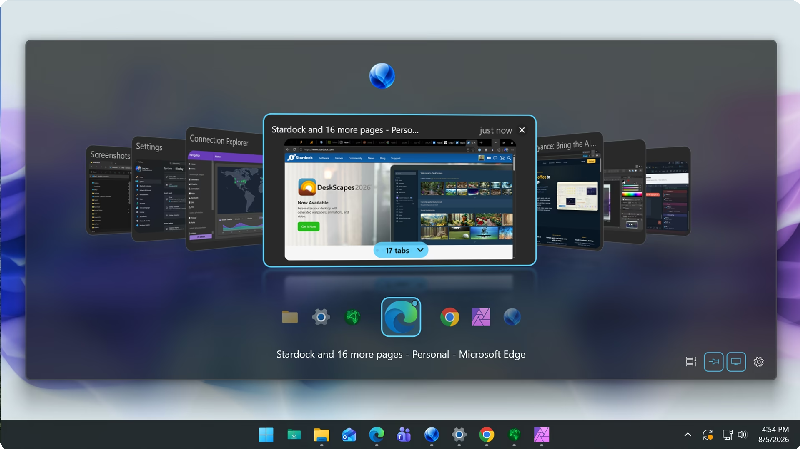
AltTabby replaces the standard Windows Alt+Tab experience with customizable layouts and productivity features that help you switch between applications faster.
- Personalized to your workflow
Choose from multiple layouts, customize how windows are grouped, and fine-tune nearly every aspect of the interface. - Customize every detail
Adjust icon size, spacing, transparency, rows, columns, colors, animations, and more to create the perfect switching experience.
Enhance your productivity
with advanced switching.
Navigate between applications with greater speed using features built to help you locate the correct window on your first attempt.
- Pin apps to hotkeys
Set custom keyboard shortcuts for your go-to applications so they remain a single keypress away, regardless of when you last opened them. - Find windows instantly
Integrated search capabilities and intelligent grouping allow you to quickly pinpoint the specific application you need, even with dozens of active windows open.
Take complete control
of Alt+Tab.
Whether you prefer a clean modern layout or something more familiar, AltTabby lets you create the window switcher that works best for you.
- Smart window organization
Configure how windows are grouped, displayed, and prioritized so switching between tasks feels natural. - Designed for your desktop
Choose from multiple layouts inspired by classic Windows designs or modern interfaces with complete visual customization.
How AltTabby is Used?
Always Find the Right Window
AltTabby minimizes time spent searching for applications so you can stay focused on your work by intelligently arranging your active windows according to your actual PC habits.
- Learn your most frequently used windows.
- Blend recent activity with usage history.
- Predict and pre-select the next likely window.
- Quickly clear learned data at any time.
Switch Windows Your Way
Not everyone switches tasks the same way. AltTabby lets you invoke your window switcher exactly how you prefer.
- Replace the traditional Alt+Tab shortcut.
- Launch with your mouse or Win+Tab.
- Open directly into search mode.
- Configure secondary hotkeys for different workflows.
Keep Windows Organized
Take complete control over how windows are grouped and displayed.
- Group windows by application or process.
- Combine Groupy tabs into a single switcher entry.
- Create application exclusions.
- Customize ordering and grouping behavior.
Fine Tune Every Interaction
Go beyond appearance and customize how AltTabby behaves while you're switching between applications.
- Configure hover expansion delays.
- Show browser tabs as cards.
- Choose monitor and virtual desktop behavior.
- Automatically expand groups and detect application tabs.