
Ashampoo Photo Optimizer Pro 26 - PC
Buy Ashampoo Photo Optimizer Pro 26 now!
Ashampoo Photo Optimizer Pro 26 enhances your photos with one click, delivering quick, automatic results, even in batch mode.
Activation, download and installation of this Product via Ashampoo App Platform (Download Manager): Download Link
You can also click here to download directly.
You will receive your code to redeem in your account within minutes by eMail. In order not to miss out the mail, please check the spam or junk mail folder too!
Achieving ideal image quality with the smallest file size.
Photos are invaluable memories that capture special moments in our lives. However, they don't always turn out as expected or may have room for enhancement. Ashampoo Photo Optimizer Pro 26 allows you to maximize the potential of your photos with just one click, delivering impressive results quickly and automatically—even with convenient batch processing!
Efficient image compression with complete control
The new image compression feature allows you to achieve the perfect balance between quality and file size. JPG, WebP, and PNG files can now be reduced quickly and accurately, with an interactive live before/after preview. As you adjust the settings, you’ll see the expected file size in real-time, maintaining full control over the final result. Save valuable storage space without compromising on quality—perfect for online use, archiving, or sharing images quickly.
- Perfect image quality at optimal file size
- New image compression with live preview and file size control
- 27 new LUTs for fresh one-click looks
- New photo frames for additional image moods
- Modernized user interface
- Enhanced RAW support and optimized metadata handling
Features:
27 Brand-New LUTs included!
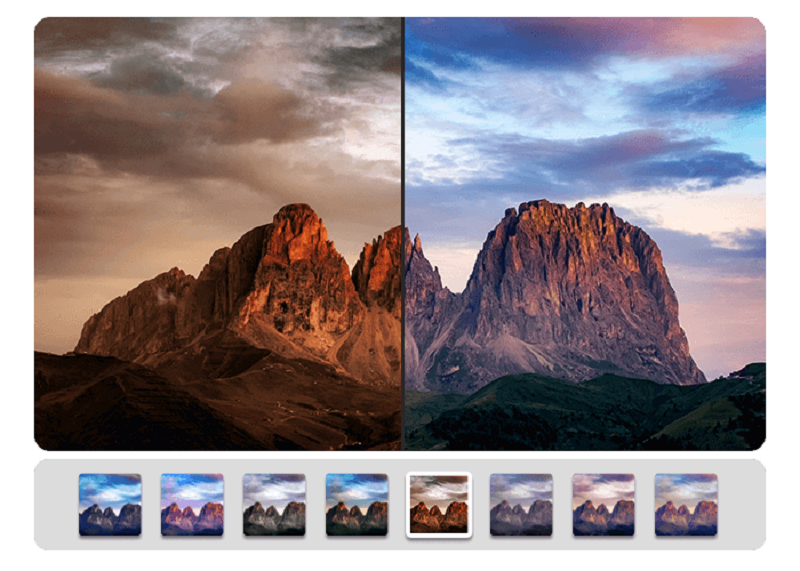
LUTs (Look-Up Tables) simultaneously adjust various image parameters like hue, saturation, brightness, and contrast, transforming photos with a fresh look and mood. In this new version, the LUT collection has been greatly expanded: Three new LUTs have been added to each of the nine categories—Halloween, Christmas, Autumn, Summer, Vintage, Contrast, HighKey, LowKey, and FX. This adds 27 new styles, perfect for seasonal images, creative effects, or bold contrast looks.
New frames, new formats, new look
Photo Optimizer has been refined with targeted improvements, both visually and technically. The addition of new frames broadens the design library, offering more options for various image moods. Meanwhile, the revamped interface delivers a more modern, streamlined look while maintaining the familiar, user-friendly workflow. Additionally, RAW format support has been greatly improved, and metadata handling has been optimized for cleaner, more reliable processing.
Perfect results almost instantly
You can spend hours meticulously optimizing every aspect of your photos in search of the perfect look–or you can achieve the same in seconds using our lookup tables crafted by image editing experts. Dissatisfied with the lighting of a whole series of shots? Looking for that uniform exposure across your photo collection? LUTs will fix these issues and add the visual harmony and polish your shots deserve! From now on, visual excellence may always be just one click away!
Level up your vacation, wedding, and party shots!
Straighten misaligned shots, fix perspective errors, or apply a whole range of beautiful effects. Minor issues like red eyes, skin imperfections or stains are now easily fixable. Save time and nerves and achieve stunning results almost instantly with Photo Optimizer!
Important basics and creative freedom
Naturally, Ashampoo Photo Optimizer includes all the usual suspects like image cropping, rotating, watermarking, and softening. But it doesn't stop there. Feel free to get creative with artistic effects and elegant frame designs. Whether you're recovering failed shots, cranking up the image quality by another 5% or just having fun, this is the program for you!
The lifesaver for your vacation shots
Visual blemishes are detected and fixed through careful image analysis. Our carefully crafted algorithm fully automatically optimizes colors, contrasts, and exposure times for single shots or entire collections, turning underwhelming shots into brilliant photos!
A matter of perspective!
Taking shots of buildings often leads to unpleasant, and easily noticeable, perspective distortions, due to the position of the photographer. Buildings and other tall objects almost seem to fall over, putting an unintended comical spin on your photos. Other times, you forgot to bring your tripod and failed to keep your camera completely straight. Enter Photo Optimizer's new perspective correction! Fix horizontal or vertical distortions in just a few clicks and save shots that would have otherwise gone straight to the bin. Give your photos a second chance and get the right perspective, always!
Quick Access & Improved Photo Quality
Ashampoo Photo Optimizer introduces a customizable "Favorites" menu, making your most-used features instantly accessible—no need to navigate through multiple menus. Whether it’s straightening horizons, fixing perspectives, or cropping, everything’s just a click away. Plus, the auto-optimization now includes enhanced white balance and contrast adjustments to fix dull, low-contrast images, reviving photos that might otherwise look lifeless.
Versatile export features
Good photos deserve to be seen. That's why we're offering various ways in Photo Optimizer to share your photos with others. This includes email, the free Ashampoo Web and even just setting photos as your desktop background image. If you'd rather go the traditional route and print your photos, you'll love the feature-rich print dialog that not only creates high-quality but also space-efficient print outs, if needed.
Easy Portrait Enhancement & Batch Processing
Photo Optimizer lets you perfect portraits with ease—fix red eyes, whiten teeth, and remove flaws for natural-looking results. Plus, with batch processing, you can quickly enhance your entire photo library, saving time while optimizing each image automatically. Perfect for any collection, from vacations to special events!
Requirements
- You need the 64-bit version for the following operating systems:
Win 11, Win 10 64Bit - Requirements
Any device that supports the operating systems listed above. - Other
Visual C++ 2015 x64 Redistributable