


QSpace Pro - 2 Mac - Lifetime
Buy QSpace Pro - 2 Mac - Lifetime Key.
Download Link: QSpace Pro
A better Finder, more flexible and has rich features!
- Two devices per account max
- System Requirements: macOS 10.15 or later, both Intel and Apple chips.
You will receive your code to redeem in your account within minutes by eMail. In order not to miss out the mail, please check the spam or junk mail folder too!
With MacZip inside, you can browse archives just like browsing folders! And QSpace can connect to FTP, SFTP, WebDAV, Dropbox, OneDrive, Google Drive, Aliyun Drive, SMB, NFS, AFP, Amazon S3(and S3 compatible), Aliyun OSS servers. It has similar interface like Finder, and supports more customizations and practical features.
Switching Between 12 Layouts
Easily compare, copy, or move files between folders in one window. Simple, efficient, and intuitive!
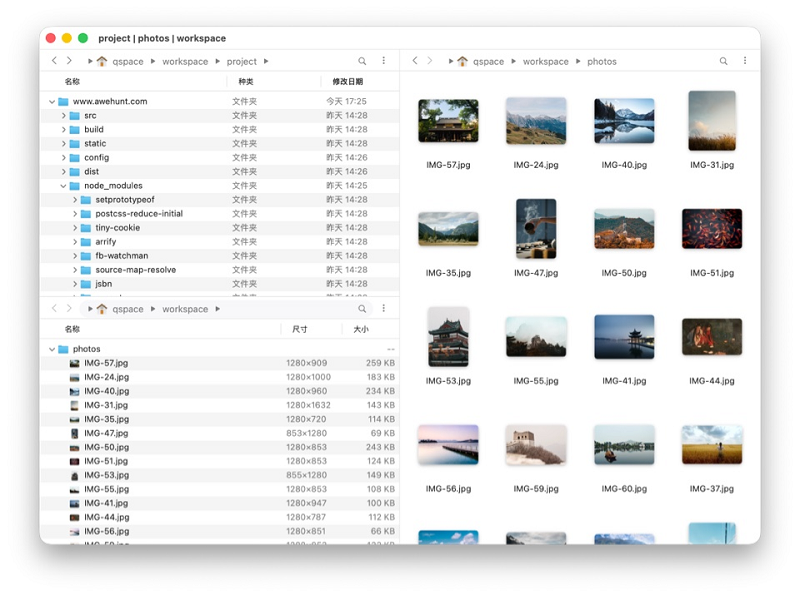
Instant Access to Any Location
Interactive address bar for quick folder navigation. Manual input with auto-completion!
Open Terminal & Editor Instantly
Instantly open a terminal or editor for the current folder, with full customization support for the apps you prefer to use.
Calculate Hashes in One Click
Instantly calculate and compare file hashes!
Supported algorithms: MD5, SHA256, SHA128, SHA224, SHA384, SHA512, CRC32.
Fully Customizable Experience
Switch to Windows Key Bindings Instantly.
Customize Everything Your Way.
Quick File Creation
Instantly create files of any type, with support for both predefined templates and custom content.
Extension: Enhanced Archiver
Browse archives directly, just like ordinary folders.
Extract over 20 archive types, including rar, zip, 7z, tar, gz, bz2, xz, lzma, lz4, and more.
Extension: Server Connections
Work with remote files as if they were stored locally — copy or move them effortlessly with simple drag‑and‑drop.
The extension supports connections to over 20 server types and cloud services, including FTP, SFTP, WebDAV, Dropbox, OneDrive, Amazon S3, and more.
Extension: Stash Shelf
Easily collect files and images from local, server, web, or clipboard!
Perform various operations such as copy, move, share, rename, calculate hashes, and run services.
Extension: Advanced Batch Rename
Mix and match naming rules freely with live preview.
Add, replace, or remove text segments, with full support for optional regular expressions.
Activation guidance:
1. Start "QSpace" and click on "Preferences..." in the menu bar.
2. Click on the "Features" and "Login" buttons in the pop-up window.
3. In the preference settings interface, click on the "···" icon in the upper right corner, select "Redeem", and enter the authorization code.
4. If you need to purchase multiple paid extensions, repeat step 3.
We strongly recommend that users receive a "limited time free" archive enhancement extension.