

Piclio - 2 Macs - Lifetime
Buy Piclio - 2 Macs - Lifetime Key.
Download Link: PipNow
- Interface Languages: Simplified Chinese / Traditional Chinese / English (Switchable in Settings).
- Device Limit: Can be installed on up to 2 devices.
You will receive your code to redeem in your account within minutes by eMail. In order not to miss out the mail, please check the spam or junk mail folder too!
Piclio is a Mac image viewer with light photo editing built in. It behaves the way Windows image viewers do — double‑click for a full view, use the arrow keys to flip through images, and scroll to zoom — so anyone who has just switched from Windows to a Mac can get started immediately, with nothing new to learn. When you need more, you can crop, adjust, add markup, or batch convert, compress, and watermark an entire set at once. Every image is processed locally, and nothing is uploaded.
- Instantly familiar: double-click to view, arrow keys to flip, scroll to zoom — just like on Windows
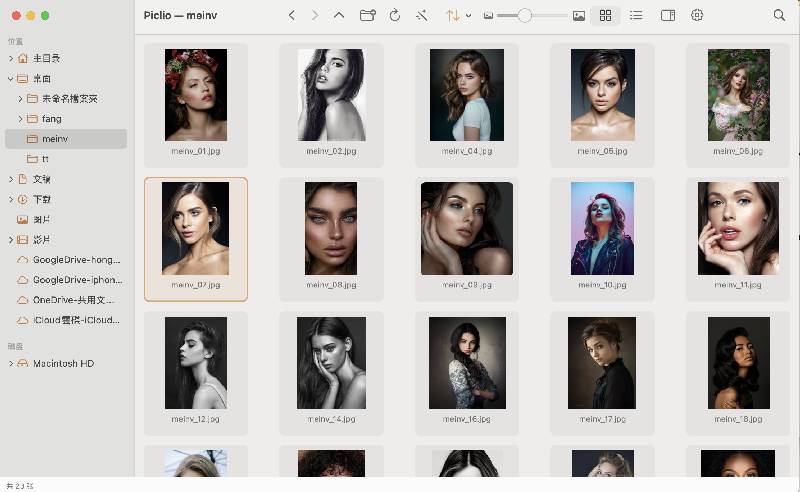
- Folder thumbnail browsing with HEIC / RAW previews
- Light editing: crop, rotate, adjust, auto-enhance, markup
- Batch convert / resize / compress / rename / watermark
- EXIF info and side-by-side compare
- Fully local, no uploads; originals kept, deletes go to Trash
Features
Folder & Thumbnail Browsing
Pick a folder and get an instant thumbnail grid. Supports JPG / PNG / HEIC / WebP / GIF / TIFF plus common RAW previews. Opens fast, flips fast.
Large-Image Viewing & Zoom
Double-click for full view, arrow keys to move between images, scroll to zoom, fit-to-window or actual size — smooth and responsive.
Batch Processing
Batch convert (JPG / PNG / WebP / HEIC / TIFF / AVIF), resize, compress, rename, and rotate — then export a whole set at once.
Bulk Watermark / Logo
Apply logos or watermarks across an entire set — with multi‑layer support, 3×3 anchor positioning, and opacity control. Save common setups as presets, complete with live preview while batching.
Editing & Markup, Non-Destructive
Crop, rotate, brightness / contrast / saturation, one-tap enhance, plus arrow / rectangle / ellipse / text markup. Originals are kept by default — save a copy or overwrite; deletes always go to the Trash.
EXIF Info & Side-by-Side Compare
The info panel shows filename / dimensions / size / format / date plus EXIF such as camera / lens / ISO / aperture / shutter / focal length. Compare two images side by side with synced zoom and pan.
Interface Languages:
Simplified Chinese / Traditional Chinese / English (Switchable in Settings).
Device Limit:
Can be installed on up to 2 devices.
How to Activate:
Open Piclio, go to Piclio > Piclio Pro… in the menu, and enter your license key to activate.