

VMPal for 1 Mac - Individual - 1 Year
Buy VMPal for 1 Mac - Individual - 1 Year Key.
Download Link: VMPal
Every system, one Mac.Get VMPal.
Apple silicon macOS 26 or later.
Update Note: 1 year of updates and support
You will receive your code to redeem in your account within minutes by eMail. In order not to miss out the mail, please check the spam or junk mail folder too!
Virtual Machines built for Apple silicon and AI agents.
Lightweight, beautiful and smooth like butter.
macOS × Windows × Linux with GPU acceleration
- macOS
Straight from Apple, installed in minutes, with Metal on your Mac's GPU. VMPal Tools add the clipboard and drag & drop. On macOS 27, setup takes no clicks. - Windows 11
VMPal's own engine, installed for you. Retina up to 5K, a TPM 2.0, USB devices, Direct3D 11 and OpenGL 4.1 on your Mac's GPU. - Ubuntu and Fedora
Installed for you in minutes. OpenGL 4.1 on your Mac's GPU, Rosetta for Intel programs, and nested virtualization.
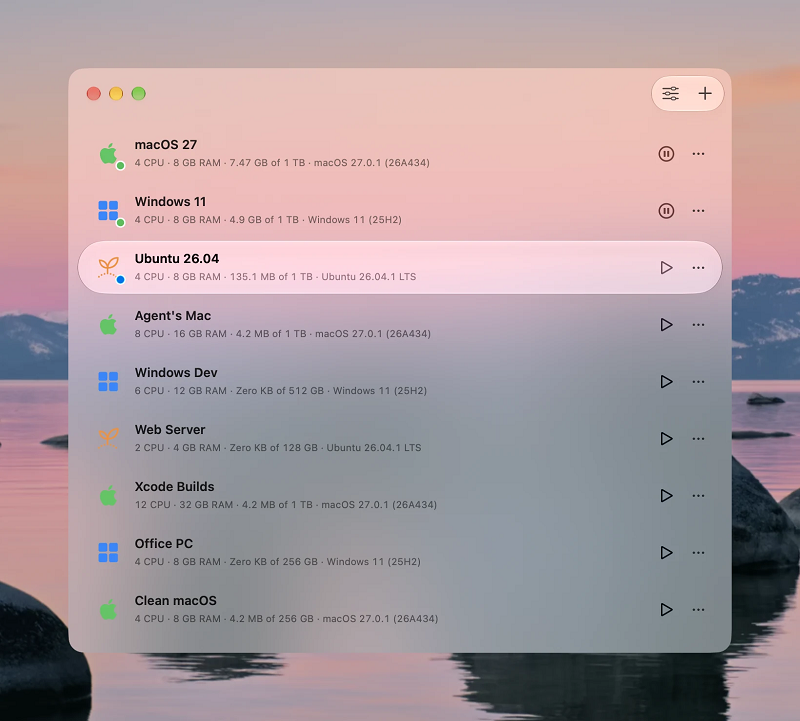
Features:
- Lightweight
A VM's disk is only as big as what's in it. It moves to another Mac in one file, and clones take space only as they change. - Fast on every system
macOS and Linux on Apple's Virtualization framework, Windows on VMPal's own engine. Each draws on your Mac's GPU. - Beautiful design
We care about the details. Every pixel in VMPal is perfectly aligned and made to feel at home on macOS. - Sharp on Retina
The display follows the window, at your Mac's scale, up to 5K. - Installed for you
Pick macOS, Windows 11, Ubuntu, Fedora, CentOS Stream, Pop!_OS or Kali Linux, the newest or an older release, or an IPSW or ISO you have. VMPal downloads it and installs it in the VM's window, with your account and VMPal Tools. A cover keeps stray clicks out until it's ready. - Share everything
Clipboard with files both ways, drag and drop in and out of every VM, and Mac folders in Finder, Explorer and Files. - Snapshots
Save a VM as it is, running or not, and roll back in seconds. Each takes space only as the VM changes. - Port forwarding
Reach a web server or SSH in any VM through a port on your Mac. - Live settings
Name, disk, shared folders and network change while the VM runs. - Sound and mic, per VM
Each VM gets only what you allow, and a green light shows when the mic is in use. - Its own app in the Dock
Each VM runs as an app of its own, with its own Dock icon. A crash stops only that VM. - Import from Parallels
Bring your Parallels VMs over in a few clicks.
Give your AI agent its own machine.
- Stop Clicking "Allow" — Zero Permissions Needed
On your primary Mac, an AI agent constantly pauses for Accessibility, Screen Recording, app permissions, and password prompts, leaving you stuck waiting. Certain system dialogs can't be clicked by automation at all. In VMPal, the agent operates directly through the virtual machine’s own native mouse and keyboard. To the OS, it looks like a real user—allowing it to run installers, handle permission popups, and sign in completely on its own. - A Dedicated Machine that Never Interrupts You
All that execution power stays safely isolated inside a full Mac, PC, or Linux virtual machine. Your host Mac, local files, and primary display remain completely untouched, and you can disable agent control for any VM at any time. - Undo Anything with Built-in Snapshots
Take a snapshot before the agent begins its task. If anything goes off course, simply restore the entire machine back to its exact prior state in seconds. - Set up in one click. Built-in MCP.
One click adds VMPal to Claude Code, Codex, Grok Build, Antigravity and other agents, in the VM or on your Mac. The agent can then see the screen, take the controls and run commands, as you or as an administrator.
Write Your Own Review
Ashampoo UnInstaller Pro 27 - PC
Special Price
$24.74
Regular Price
$47.14
TCP Viewer for 2 Macs - Combo - 1 Year
Special Price
$80.49
Regular Price
$114.99
TCP Viewer for Mac - Standard - 1 Year
Special Price
$57.49
Regular Price
$80.49


Ashampoo Office 27
Special Price
$27.59
Regular Price
$80.49
QSpace Pro - 2 Mac - Lifetime
Special Price
$27.59
Regular Price
$101.20
AltTabby - 5 PCs - 1 Year
Special Price
$18.39
Regular Price
$80.49
Upsell Products


SeekFast for PC/Mac - Business- Lifetime
Special Price
$68.99
Regular Price
$361.09


SeekFast for PC/Mac - Personal - Lifetime
Special Price
$32.19
Regular Price
$172.49
Ashampoo Photo Commander Pro 27
Special Price
$30.58
Regular Price
$65.19


AWZ Media Player - 1 Mac - Lifetime
Special Price
$29.89
Regular Price
$97.75


AWZ PC Cleaner - 1 PC - Lifetime
Special Price
$28.74
Regular Price
$149.49
4-Organizer Nano - 1 PC - Lifetime
Special Price
$103.49
Regular Price
$195.49