
Formlo - 2 PCs/Macs - Lifetime
Buy Formlo - 2 PCs/Macs - Lifetime Key.
Subtitling, translation & video conversion · macOS / Windows
Download Link: Formlo
Update Note: Free updates within the current major version.
You will receive your code to redeem in your account within minutes by eMail. In order not to miss out the mail, please check the spam or junk mail folder too!
Formlo - Subtitling, translation & video conversion · macOS / Windows
Formlo is a subtitling tool for macOS and Windows that puts the whole chain — generate subtitles, tune the line breaks, translate to bilingual, burn into the picture — in one window, with video remuxing and audio extraction alongside it. Beyond polishing a single video, it can point at an entire folder and subtitle or burn the lot.
Three workspaces: Subtitles polishes one video, Convert handles containers and audio, and Batch subtitles runs a whole folder through.
- Generate subtitles in one click, or edit an imported SRT
- Long / medium / short splitting, with re-split and merge
- Bilingual subtitles via on-device or online translation
- Burn subtitles in, with adjustable size, margin, and outline
- Lossless remux; extract audio to MP3 / WAV / FLAC / ALAC
- Scan a whole folder and fill in only what is missing
Three workspaces, one per stage
- Subtitles
Import a video, generate subtitles or bring in an SRT, tune the line breaks and the translation, then export a subtitle file or burn it straight in. This is where a single video gets polished. - Convert
Change the container, adjust resolution and bitrate, or pull out just the audio track. Lossless passthrough skips re-encoding entirely; audio extraction covers both lossy and lossless formats. - Batch subtitles
Point it at a folder, let it scan every video and report subtitle status, set the translation engine and typography once, then run the lot. Built for clearing a backlog in a single pass.
Features:
-
Generate and edit line by line
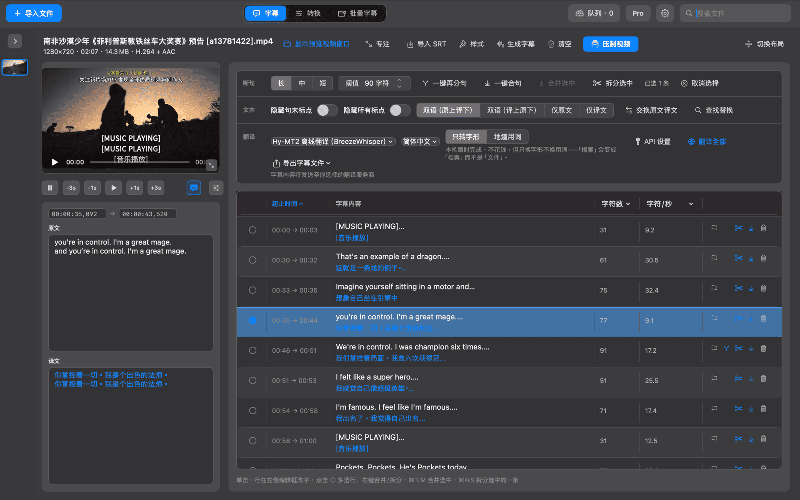
Create subtitles from any video with a single click, or bring in your own SRT file. Every subtitle cue displays its start/end timestamps, total character count, and characters per second—selecting any row opens it instantly in the editor while jumping the video preview to the exact frame. -
Control how lines are split
Choose between Long, Medium, or Short presets, or specify your own custom character limit. Easily re-split or combine the entire track with one click, or manually split and merge chosen cues so every sentence stays natural and no line exceeds your length limit. -
Bilingual subtitles, your choice of engine
Switch seamlessly between four layout options—bilingual (with either language positioned on top), source language only, or translation only—and toggle between them with a single click. Translate locally using the on-device Hy-MT2 engine (BreezeWhisper) or link an external service like DeepL. -
Two kinds of Chinese script conversion
Instant, cost-free on-device glyph conversion changes character forms while preserving the original wording; idiomatic conversion adjusts localized phrasing as well, adapting terminology to match how native readers in the target region actually speak. -
Burn-in and typography
Export as a standalone SRT file, or hardcode the subtitles directly into the video. Fine-tune font sizing, vertical positioning, typography, and text outlines (featuring bundled Source Han Sans with white text and a clean drop shadow)—configured independently for landscape and portrait videos with real-time previewing. - Lossless remux and audio extraction
The Convert tab offers three modes: lossless passthrough with zero quality loss, re-encode to change resolution or bitrate, and audio-only. Audio can be extracted as-is to a lossless .m4a, or written out as MP3, M4A, WAV, FLAC, or ALAC. - Batch a whole folder
Point it at a folder (subfolders included) to scan every video, flagging which already have subtitles, which are missing them, which failed, and whether each is landscape or portrait. Then subtitle them all, burn them all, or fill in just the ones that are missing. - Queue and background work
Burn-in and conversion jobs go into a queue and run in turn, so you are not babysitting them one at a time. The search box at the top filters everything you have imported.
Installation:
These steps are for the Mac version, which downloads as a DMG disk image. For Windows, download the EXE installer, double-click it, and follow the prompts.
-
Download and open
Use the button above to download the DMG and double-click it to mount the disk image. The button always points at the current release.
-
Move it to Applications
In the window that opens, drag Formlo into your Applications folder, then eject the disk image and launch it from Applications.
-
Updates from there on
Once installed, the app checks its own update channel for new versions — no need to come back to this page each time.
System requirements: the Mac version requires macOS 14.0 or later; the Windows version supports Windows 10 / 11. Earlier systems are not supported.
Who it's for:
-
Subtitle creators
-
Video translators
-
Independent creators
-
Course and training video teams
-
Teams that need bilingual subtitles
-
Large backlogs awaiting subtitles