
TCP Viewer for Mac - Standard - 1 Year
Buy TCP Viewer for Mac - Standard - 1 Year Key.
Download Link: TCP Viewer
A simpler, Mac-native Wireshark alternative.
You will receive your code to redeem in your account within minutes by eMail. In order not to miss out the mail, please check the spam or junk mail folder too!
Easy packet capture
Simple, but powerful. Choose an interface, start recording, and keep packet capture calm even when the network is busy.
Open source, with paid Individual and Team plans.
Read, build, modify, and share TCP Viewer under GPL v2 or later. Paid plans activate PRO features in our signed Mac builds and include device seats, update coverage, and email support without limiting your GPL rights.
Why choose TCP Viewer?
A native packet viewer from the team behind Proxyman.
- Network development 6+ years
The Proxyman Team has spent more than six years building network debugging tools. - Proxyman users 800,000+
Developers worldwide use Proxyman, built by the same team as TCP Viewer. - Open source GPL v2+
Read the source, build the app, or contribute on GitHub. - Built for macOS Native
Made for Apple Silicon Macs running macOS 15 or later. - Network products
Proxyman, Tiny Shield, and TCP Viewer come from the same team.
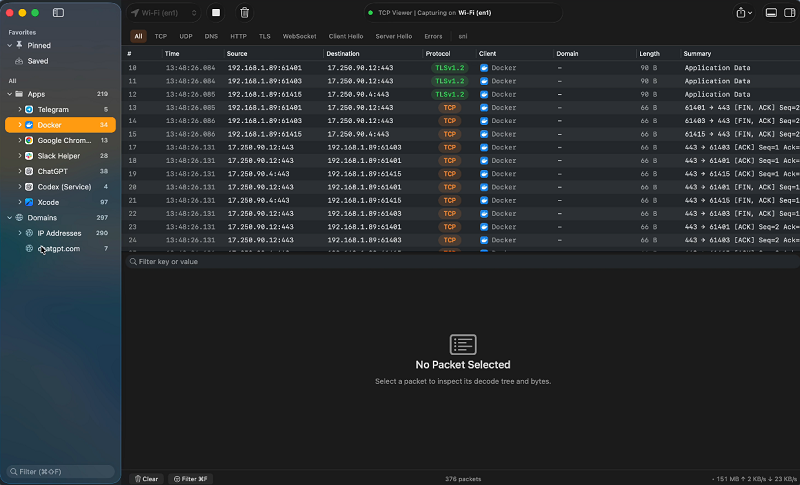
See packet details like Wireshark
TCP Viewer is built on Wireshark's packet analysis engine. Explore decoded protocols, field values, and raw bytes in a native Mac interface.
- Expand the protocol tree to inspect each layer of a packet.
- Select a field to highlight its matching bytes in the hex view.
- Search and copy details from live captures or saved PCAP files.
Explore packet inspection
TCP Viewer is distributed under GPL v2 or later, in line with Wireshark's license. See the open-source acknowledgements.
Ask your AI agent about the packets
Connect TCP Viewer to Codex or another MCP client. Check capture status, explore interfaces, and find the packets that matter with a plain-language prompt.
Open PCAP and PCAPNG files by drag and drop
Bring an existing capture into TCP Viewer and preview the packets right away, with no fresh recording session required.
- Drag in a trace
Drop PCAP or PCAPNG files straight onto TCP Viewer. - Preview immediately
Open the packet list and decoded detail view without a live capture. - Keep the workflow native
Review saved evidence in the same Mac-first packet interface.
Read the whole TCP conversation
Get the familiar Wireshark Follow TCP workflow in a focused, Mac-native window—reassembled, direction-aware, and easy to trace back to the source packets.
- Reassemble one TCP conversation instead of reading payloads packet by packet.
- Keep both directions together, or isolate Client → Server and Server → Client.
- Switch between readable text and exact hex bytes without leaving the stream.
- Search the transcript, count matches, and move to the previous or next result.
- Reveal a transcript record in the packet table, then inspect its matching bytes.
Inspect without the clutter
Whatever you capture, TCP Viewer keeps the important traffic readable. Filter noise, open decoded fields, and save evidence for the next debug session.
- Group packets by domain or client
Collapse busy captures into readable conversations by domain or client, then jump straight to the traffic that matters. - Quickly filter TCP, UDP, DNS, and more
Tap protocol chips to focus the packet list without rebuilding a complex filter every time the capture changes. - Save evidence as PCAP or PCAPNG
Package the exact packets you need into standard capture files for Wireshark, teammates, or the next debug session. - Read Wireshark-grade packet data
Open decoded fields, protocol trees, byte ranges, and field values with Wireshark-grade depth in a focused Mac interface.
See the whole capture at a glance
Overview puts packet totals, traffic over time, protocol use, and the top apps and destinations on one screen.
- Check the main totals. Review the capture duration, packet count, and the amount of data sent and received.
- Spot busy moments. Use the traffic chart to identify when upload or download activity shifted.
- Find busy apps and destinations. Rank applications, domains, and IP addresses by their total traffic.
- Check protocol use. See which protocols consumed the most data during the capture.
- Open the packets behind a result. Select a top row, then return to the packet list, or open Endpoints to dig deeper.
Capture and inspect packets from Terminal
Start a capture, query matching traffic, follow TCP streams, and export PCAP files from a shell script.
- Run captures from scripts. Start, pause, resume, or stop a capture using the same commands every time.
- Query the exact traffic. Filter by protocol, domain, address, port, app, stream, or decoded field.
- Handle results in scripts. Parse stable JSON and rely on exit codes to halt a failed script.
- Export standard files. Export all packets or only matching ones as PCAP or PCAPNG for another tool or teammate.
- Use the filters you already know
Paste a Wireshark display filter into TCP Viewer. It shows the packets that match and does not change your capture.
- Find exact traffic. Match a protocol, address, port, stream, or packet field.
- Fix a typo fast. TCP Viewer selects the part of a filter that needs work.
- Keep every packet. Clear the filter and every hidden packet comes back.