

Path Finder - 1 Mac - Lifetime
Buy Path Finder - 1 Mac - Lifetime Key.
Download Link: Path Finder
THE #1 FILE MANAGER FOR macOS!
You will receive your code to redeem in your account within minutes by eMail. In order not to miss out the mail, please check the spam or junk mail folder too!
Update Note:
Lifetime license, includes 1 year of free updates. You can update to any version released within the first year after activation. Once the year ends, your license remains valid permanently for the current version, but further updates will not be included.
THE #1 FILE MANAGER FOR macOS!
Path Finder gives you all the tools you need to take control of your files. Boost your macOS productivity with Path Finder
- Native support for Apple Silicon
Runs fast and smooth on the latest and greatest Macs. - Dropbox integration
Full Dropbox integration — just link your account, and you're all set up.
- Redesigned for Ventura
The code has been polished and supercharged so it flies on Ventura.
- Folder Sync
FolderSync is Cocoatech's tool for folder comparison and synchronization — and it's powerful.
- Browse your iPhone
Browse files and perform file operations on your USB connected iOS devices. - One-Click Dual Pane Copy
Use Path Finder's intuitive dual-pane browser to copy files from one pane to the next, with just a single click. - Secure Delete
Delete files so they can never be recovered securely with a single click - Drop Stack
Freeze drag-and-drop operations by placing files into a temporary stack. - Smart Sorting
Sort by folders, packages, or files first. - Advanced Selection
Select files based on file name, extension, attributes, and more.
UNMATCHED PRODUCTIVITY FEATURES
Find out how Path Finder can completely upgrade your macOS experience
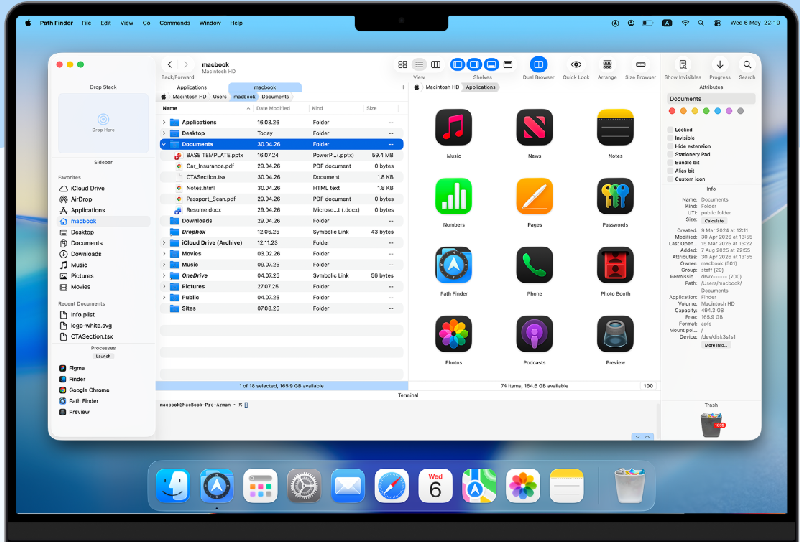
Dual Pane BrowsingUse the Dual Pane View to copy files from one pane to another with just one click.
Drop Stack to Copy/MovePath Finder's innovative Drop Stack technology has revolutionized copy/move operations on your Mac.
Advanced File and Folder OperationsPath Finder offers tons of advanced file and folder operations:
- Batch rename and select files
- Merge, compare and synchronize folders
- View and manipulate hidden files
- And much more!
Browse and find files like a proEasily access frequently used files and folders through Bookmarks and Tab Presets. Find files quickly by typing directly into the Path Navigator. Use the Filtering feature to rapidly locate a file inside the current folder.
Animated visualizer for your filesPath Finder's Size Browser lets you browse selected files and folders by their size. Additionally, the Hierarchical Columns View and Hierarchical Chart View offer detailed insight and visualization of files and folders according to their hierarchy and size.